

How interview scoring works
After a candidate finishes an AI interview, Talvin scores it for you. Every candidate on an interview is judged the same way: against the interview’s questions, the role, and any criteria you’ve set. That way you can see quickly who to look at first.
When scoring happens
Section titled “When scoring happens”Scoring starts as soon as the candidate finishes. Once the report is ready:
- the candidate appears on the interview’s Completed tab, with their recommendation and overall percentage;
- the person who created the interview gets an email saying a new interview has been completed;
- if your organization is connected to Ashby, the recommendation, scores and question summaries are sent to Ashby too.
Each candidate is scored once. If you change the interview’s settings or criteria later, candidates who are already scored keep their existing scores.
The recommendation
Section titled “The recommendation”Every report leads with a recommendation, worked out from the candidate’s overall percentage:
| Recommendation | Overall |
|---|---|
| Strong advance | 70% and above |
| Advance | 55% to 69% |
| Hold | 40% to 54% |
| Not advance | below 40% |
Next to it, the report shows how many questions the candidate answered, for example 3 of 5 questions answered. Questions the candidate never reached are left out of the score rather than counted as zero. Check this number when a candidate left the interview early.
How the overall percentage is worked out
Section titled “How the overall percentage is worked out”The overall percentage combines four parts:
| Part | Weight |
|---|---|
| Answers to the interview questions | 50% |
| Match against the job criteria | 25% |
| Your custom criteria | 15% |
| Communication | 10% |
If a part doesn’t apply, the others are scaled up to fill its place. For example, an interview without custom criteria is scored on the other three parts.
Question scores (out of 10)
Section titled “Question scores (out of 10)”Each main question gets a score out of 10, a label, and a short summary of the answer:
- Exceptional: 9 to 10
- Strong: 7 to 8
- Acceptable: 5 to 6
- Limited: 3 to 4
- Poor: 1 to 2
Under each answer, Why this score explains the score in plain language.
Scores reflect what the candidate said, not how polished it sounded. A clear, relevant answer from a nervous speaker can still score well.
Some questions show a status instead:
- Not asked: the candidate didn’t get to this question, for example because the call ended early. It isn’t scored and doesn’t count towards the overall percentage.
- The question was asked, but the candidate didn’t answer it: scored 1 out of 10.
- Answer was cut off: the candidate started answering but didn’t finish. It scores between 2 and 4, depending on what they said.
Job criteria match
Section titled “Job criteria match”When you create an interview, Talvin picks the three most important criteria from its job description (or its objective, if there’s no job description). Every candidate on that interview is checked against the same three, and each one is marked Match, Partial or No match, with a short reason.
You don’t need to set these up. Interviews created before this feature get their three criteria automatically when the next candidate is scored.
Communication (out of 10)
Section titled “Communication (out of 10)”The communication score is the average of three sub-scores, each out of 10:
- Clarity & structure: how clearly the candidate organised their answers.
- Relevance: how directly they answered what was asked.
- Language accuracy: grammar and word choice.
All three are judged from the transcript, so accent and audio quality don’t affect them.
Strengths, areas for improvement and next-round questions
Section titled “Strengths, areas for improvement and next-round questions”The report also lists the candidate’s main Strengths and Areas for Improvement. Under Ask in the next round, it suggests a few questions for your human interviewer, aimed at what this interview couldn’t settle.
Add your own scoring criteria
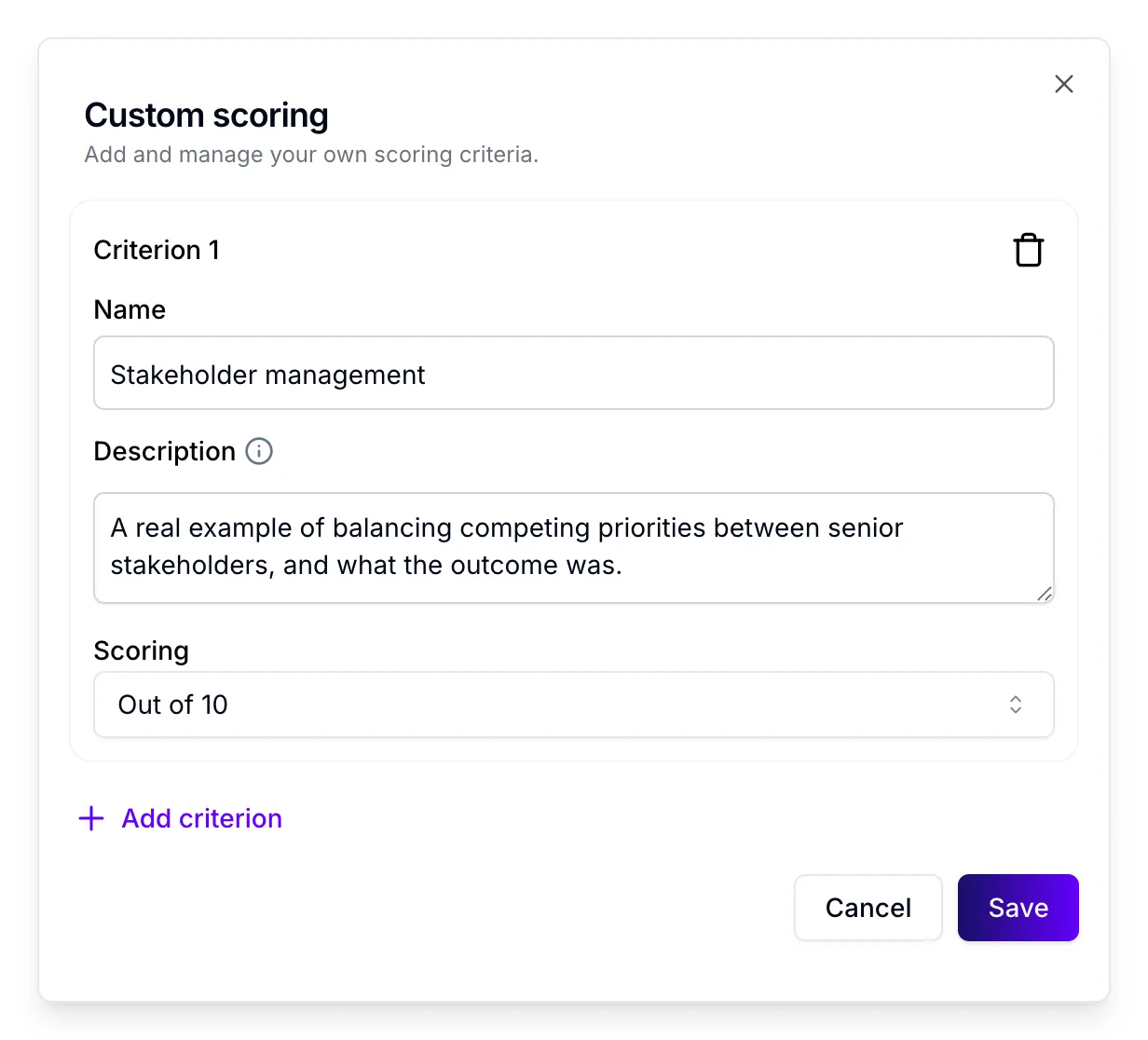
Section titled “Add your own scoring criteria”You can score candidates against criteria that matter for your role, such as “Stakeholder management” or “Has managed a team”. Add up to three per interview. Each one is scored Out of 10 or Yes / No. The results appear in the Custom Assessment Criteria section of every report, with a short explanation, and count for 15% of the overall percentage.
- Open the interview.
- Click Custom Scoring at the top of the page. If the interview already has criteria, the button shows how many, for example Custom Scoring (2).
- Click Add criterion.
- Fill in the criterion:
- Name: up to 30 characters.
- Description: what to look for. It needs at least 10 characters, but around 50 words gives better results.
- Scoring: choose Out of 10 or Yes / No.
- Click Save.
To remove a criterion, click the bin icon next to it, then click Save.
New or changed criteria only apply to candidates scored after you save. Candidates who already have a report aren’t re-scored.
Tips for writing criteria
Section titled “Tips for writing criteria”- Choose something a candidate can show by talking, such as an experience, a skill or a way of working.
- In the description, say what a strong answer sounds like and what would count against it.
- Use Yes / No for something the candidate either has or hasn’t done, and Out of 10 for something that varies in strength.
Tell us when a score looks wrong
Section titled “Tell us when a score looks wrong”On any report, use Provide feedback at the bottom of the Recommendation card.
- Click the thumbs up if the report was useful, or the thumbs down if it wasn’t.
- For a thumbs down, choose what went wrong: Too High Score, Too Low Score, Not Factually Correct, Didn’t Follow Instructions, Offensive Output or Glitch / Bug.
- Under How can we improve?, add a short comment of up to 150 characters.
- Click Save.
Your feedback is saved with the report and helps us improve scoring.
Candidates scored before 20 October 2026
Section titled “Candidates scored before 20 October 2026”Candidates scored before 20 October 2026 keep their original report. It shows an Overall Score from 0 to 100 instead of a recommendation, a Great Fit badge above 70, and a communication score broken into Pronunciation, Grammar, Vocabulary, Minimal Filler Words and Fluency. Their question scores use Poor (0 to 4), Average (5 to 7) and Good (8 to 10).
On an interview with both kinds of candidate, the list shows a recommendation for newer candidates and a 0 to 100 score for older ones.
Use scores as a guide
Section titled “Use scores as a guide”Scores help you decide who to look at first. They don’t replace your judgement, so check the transcript or recording before you make a final decision on a candidate.