

How credits work
Talvin uses credits to pay for AI interview and assessment calls. One credit covers one minute of call time.
How calls use credits
Section titled “How calls use credits”- Each minute of an AI interview or assessment call uses 1 credit.
- Calls are rounded up to the next full minute. For example, a 4 minute 10 second call uses 5 credits.
- Credits are taken after the call ends and Talvin has analyzed it.
- Credits belong to your organization, so your whole team shares one balance.
Check your balance
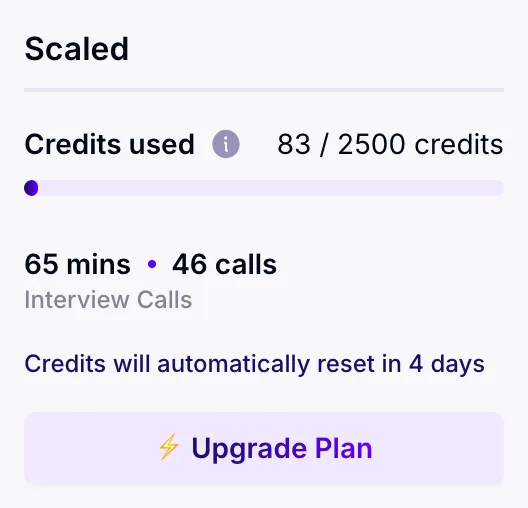
Section titled “Check your balance”Your balance is at the bottom of the left sidebar, and everyone in your organization can see it. It shows:
- Your plan name.
- Credits used: how many of your plan’s credits you’ve used, for example “120 / 500 credits”. Hover over the info icon for a short explanation.
- Bonus credits: if your balance is higher than your plan’s credits, the extra shows as “+ N bonus”. Without a plan, any credits you have show as free credits.
- Interview Calls: the minutes and number of calls used in this credit period.
- Reset date: “Credits will automatically reset in N days”.
Admins also see Upgrade Plan here.
When credits reset
Section titled “When credits reset”How often you get new credits depends on how you pay:
- Monthly billing: your plan’s credits are added each time your subscription renews and the payment goes through.
- Annual billing: you pay once a year, but your credits arrive monthly. Each month you get your plan’s monthly amount.
Unused credits don’t carry over. At each reset, whatever is left, including bonus credits, is cleared and replaced with your plan’s credits.
When you run out
Section titled “When you run out”When your balance reaches zero:
- The Interviews and Assessments pages show “You’ve reached your usage limit. Upgrade to continue using Talvin.” Admins see an Upgrade Now button.
- Candidates who open your interview or assessment links see that it’s unavailable. They can’t start until you have credits again.
If a call needs more credits than you have left, it still finishes and your balance goes to zero.
To get more credits, wait for your next reset or ask an admin to move to a plan with more credits. Changing plans clears any credits you have left, so check Change your plan first.
Other times credits are removed
Section titled “Other times credits are removed”Your remaining credits are also cleared when:
- Your subscription or trial ends. See Cancel your subscription.
- A payment fails. Your plan’s credits come back once the payment goes through. See If a payment fails.
- You change plans. The new plan’s credits are added once you’ve paid for it.